Skip to content
DearFlip WordPress
  • Plugins
    • WordPress Flipbook
    • JS Flipbook
    • Joomla Flipbook
  • Demos
    • Embedded Example
    • Popup Examples
    • Online PDF Viewer
  • Pricing
  • Docs
  • Support
  • Account
  • Blog
DearFlip WordPress
  • Plugins
    • WordPress Flipbook
    • JS Flipbook
    • Joomla Flipbook
  • Demos
    • Embedded Example
    • Popup Examples
    • Online PDF Viewer
  • Pricing
  • Docs
  • Support
  • Account
  • Blog

Getting Started

  • Getting Started – Quick
  • Installation
  • Create 3D Flipbooks
  • Create Spiral 3D Flipbook (Pro)
  • Create Hybrid 3D Flipbook (Pro)
  • Create PDF Viewer/Reader
  • Create Slider Viewer

Organizing Flipbooks

  • Organizing Flipbooks
  • Multiple Flipbooks in a page
  • Using Categories
  • Using Book Shelf (Pro)
  • Sort Flipbooks (Pro)
  • Open Flipbook with custom buttons & elements(PRO)

Features & Settings

  • Selective Script Loading
  • Features & Settings – Quick
  • Google Analytics(PRO)
  • Settings
  • Shortcode-options

Customizations

  • Customizing Layout / Controls (look)
  • Customizing Buttons
  • Customize popup thumb
  • Customize Page/PDF Links
  • Turn off Zoom on mouse scroll
  • Remove or change Download button
  • Remove Share Button
  • Open Book at certain page
  • Open Flipbook in New Tabs

FAQs

  • Icons are missing?
  • PDF not Loading!
  • PDF loading is slow!
  • Fullscreen Faqs
  • General FAQs & Issues
  • Flipbook loading issue
  • Change Log

Presale, Purchase & License

  • Purchase & Licensing / Upgrading
  • Free(Lite) vs Premium Comparision
  • License Utilization
  • License Activation issues
  • How to Change Invoice details
View Categories
  • Home
  • Documentation
  • Organizing Flipbooks
  • Using Book Shelf (Pro)

Using Book Shelf (Pro)

1 min read

Book Shelf is a pro feature available since version 2.1

Book Shelf is not applicable to single flipbook shortcode, only to multiple books shortcode

Shortcodes with id attribute : [dflip id="123"][/dflip] will not create shelves. It represents single book

Shortcodes with books attribute: [dflip books="123,234"][/dflip] or [dflip books="my_category"][/dflip]and will create shelves, they represent multiple books.

Flipbooks displayed using categories or books shortcode can be provided with book shelf. You can use a image of your liking. We recommend using wood texture.

Examples: #

Stone/Brick Texture: #

CSS BookDearFlip BrochureGLFW manualBrand Manual TemplateMazda 6Meat Atlas

Concrete Texture: #

CSS BookDearFlip BrochureGLFW manualBrand Manual TemplateMazda 6Meat Atlas

Wood Texture: #

CSS BookDearFlip BrochureGLFW manualBrand Manual TemplateMazda 6Meat Atlas

How To add Shelf Image: #

Using Global Settings: #

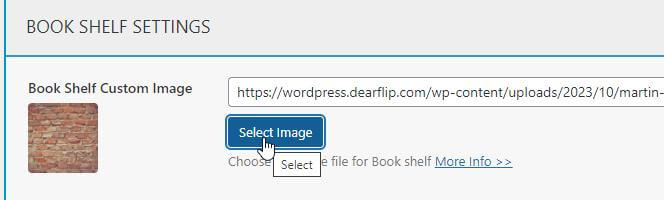
You can add a common book shelf to all multiple books(categories) shortcode. Goto dFlip Books-> Global Settings -> Popup/Lightbox -> Books Shelf Settings
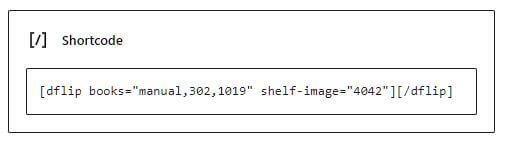
Tip: To disable shelf in certain places when shelf is enabled globally, add shelf-image="none" in the shortcode. Example: [dflip books="manuals" shelf-image="none"][/dflip]


Using Shortcode: #

If you have not set a global shelf or want to change the shelf for certain category, you can use shelf-image attribute to add shelf. It takes following values:

Possible ValuesDescription
Image ID
[dflip books="manuals" shelf-image="4042"][/dflip]
Image id of WordPress Media
Image URL
[dflip books="manuals" shelf-image="https://yourdomain.com/images/image.jpg"][/dflip]
Image URL of the image file
None
[dflip books="manuals" shelf-image="none"][/dflip]
No shelf image to be used.

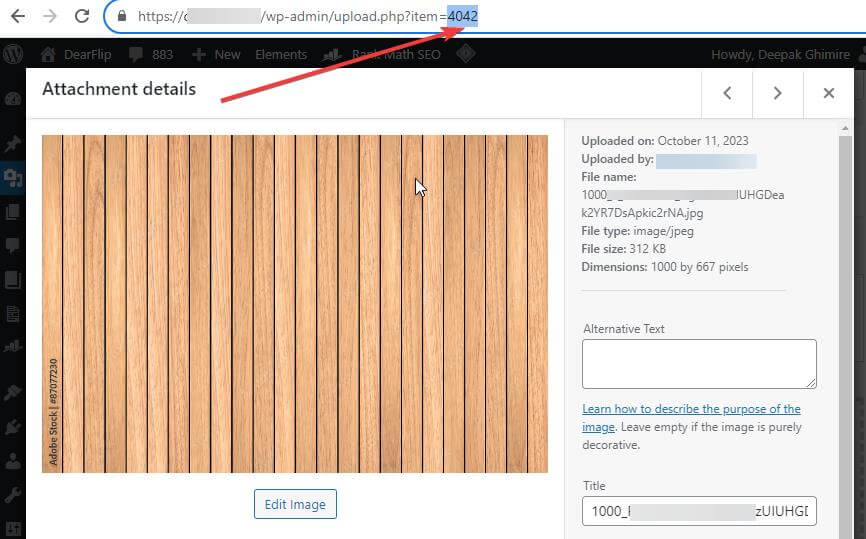
The shelf-image id is the id of image you upload to your WordPress admin.
Still stuck? How can we help?

How can we help?

Updated on March 5, 2024

2 thoughts on “Using Book Shelf (Pro)”

  1. Lisa
    December 15, 2023 at 6:37 am

    Does this feature only work in the paid version?

    Reply
    • Deepak Ghimire
      December 15, 2023 at 10:42 am

      Hi, yes Book shelves are new and available in Pro Version.

      Reply

Leave a Comment Cancel reply

Table of Contents
  • Examples:
    • Stone/Brick Texture:
    • Concrete Texture:
    • Wood Texture:
  • How To add Shelf Image:
    • Using Global Settings:
    • Using Shortcode:

Links

  • Terms and Conditions
  • License Terms
  • Privacy Policy
  • Browser Test

Recent Posts

  • (no title)
  • Protected: Flipbook in a password page
  • Case Study: Open PDF File links as Flipbook
  • Transparent background example
  • Multiple Embeds in a Page

Products

  • DearFlip 3D Flipbook JS Plugin
  • DearFlip 3D Flipbook WordPress Plugin
  • DearFlip 3D Flipbook Joomla Plugin
  • Online PDF Viewer
  • DearFlip PDF Flipbook for Chrome
  • Mashshare Social Sharing WordPress plugin
© 2026 | A product of DearHive.com