
After you have completed installing DearFlip you will get a menu added to WordPress admin, dFlip Books. Now your 3D flipbooks can be added and accessed on your WordPress site following the menu. Let’s start with creating a Flipbook Post
Example Demo: #
Video Tutorial: #
Creating a Flipbook Post #
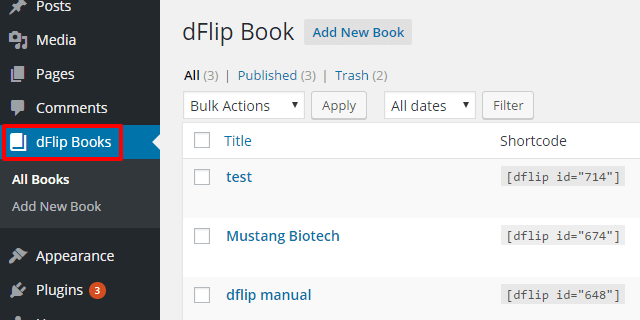
Under dFlip Books, click on the Add New Book button to create a new Book.
Add Book Source/Pages #
Book Source Type:
Sets the type of source for the book.
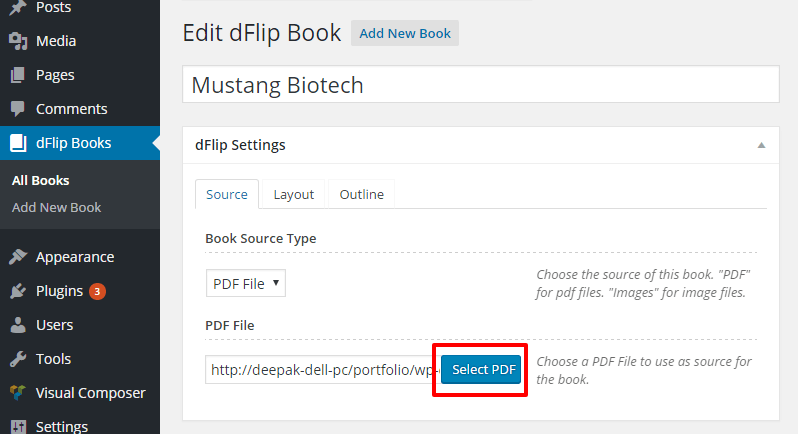
You can either add a source of the book through PDF file (Set Book Source Type to PDF)
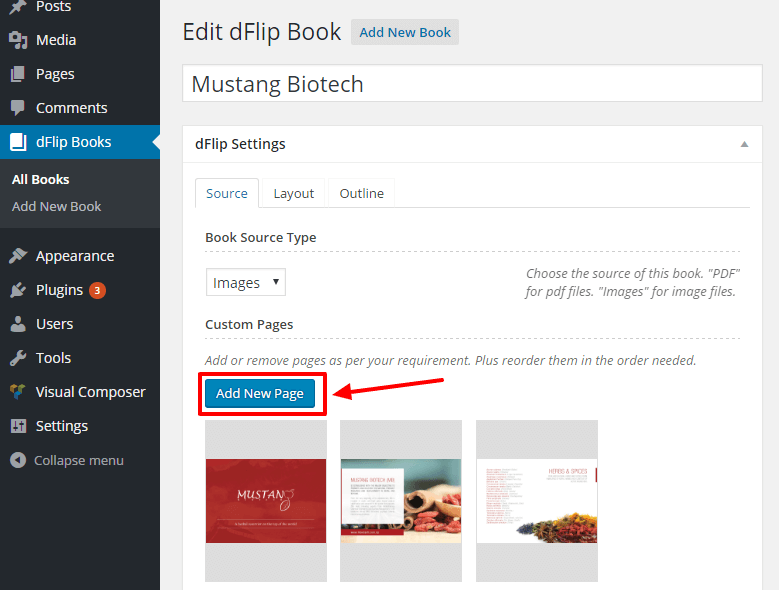
Or you can add a source of the book through Images (Set Book Source Type to Images)
Book Layout Settings #
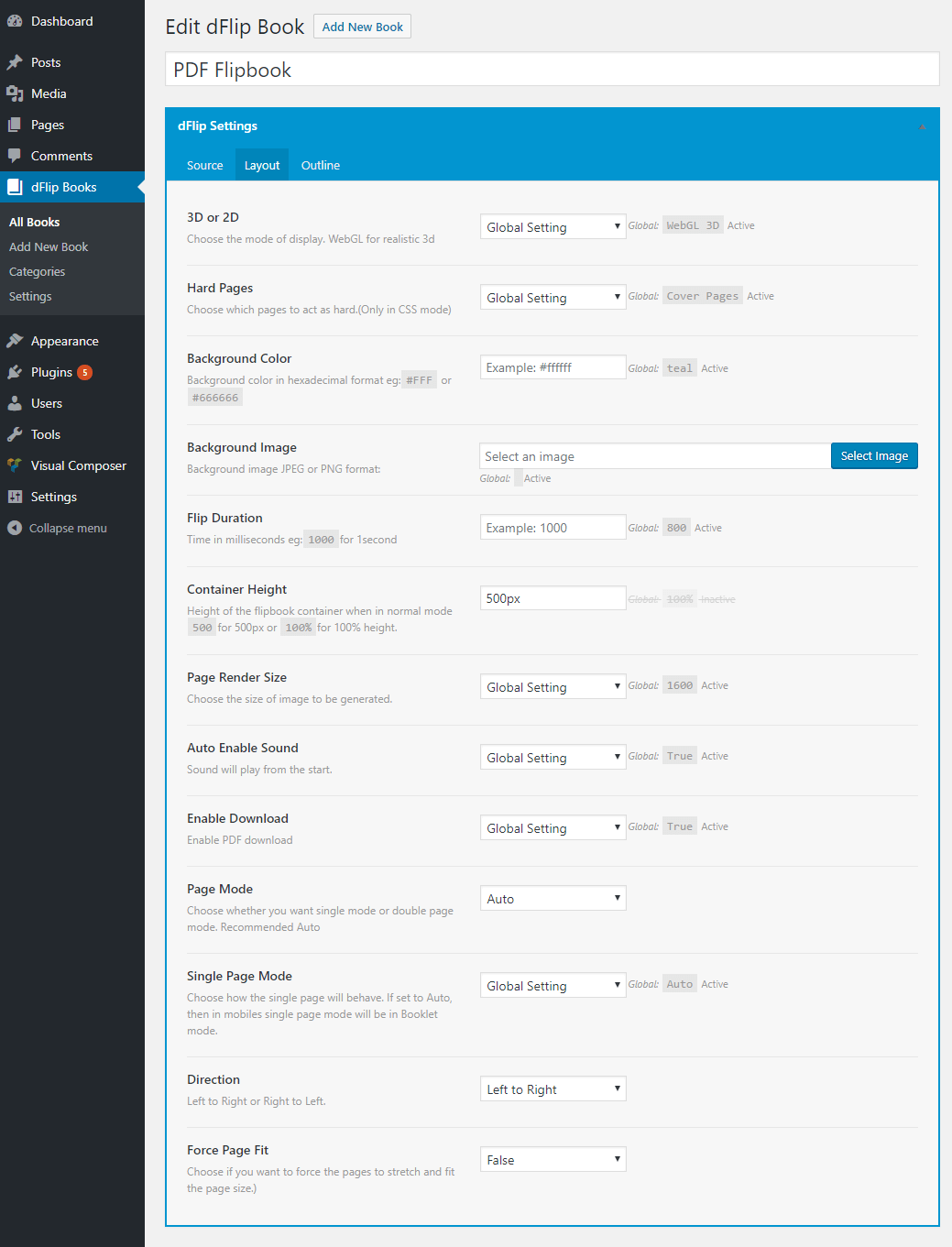
Set the layout of the source for the book.
Book Outline Settings #
Set the outline/bookmarks of source for book.

Adding Book Shortcode to Page #
Single Book Shortcodes(default type is embedded):
//Embedded Type
[dflip id="99"][/dflip]

//Button Type
[dflip id="99" type="button"]Button Text[/dflip]

//Thumbnail Type (Like in Demo)
[dflip id="99" type="thumb" tags="3d,pdf,short-sweet"][/dflip]
Multiple Book Shortcodes(default type is thumb):
//All books
[dflip books="all"][/dflip]

//All books of category "fiction"
[dflip books="fiction"] [/dflip]

//Multiple books with id 13,15,16
[dflip books="13,15,16"] [/dflip]
Once you have a book created you can use it in your page with the help of shortcode. Shortcodes are available in the dflip post type admin page. Copy the required shortcode.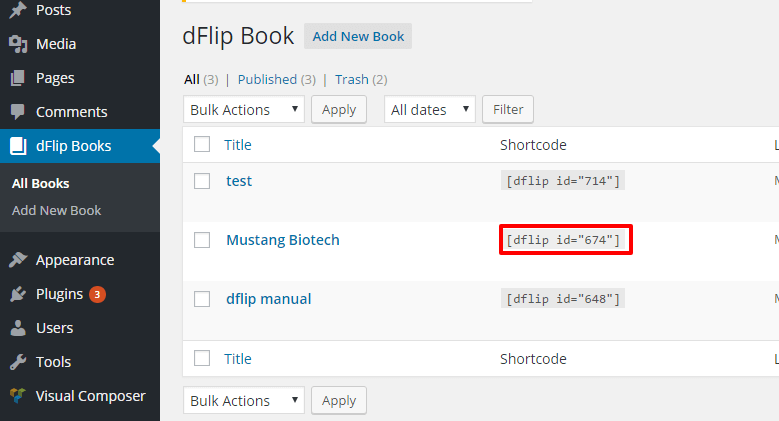
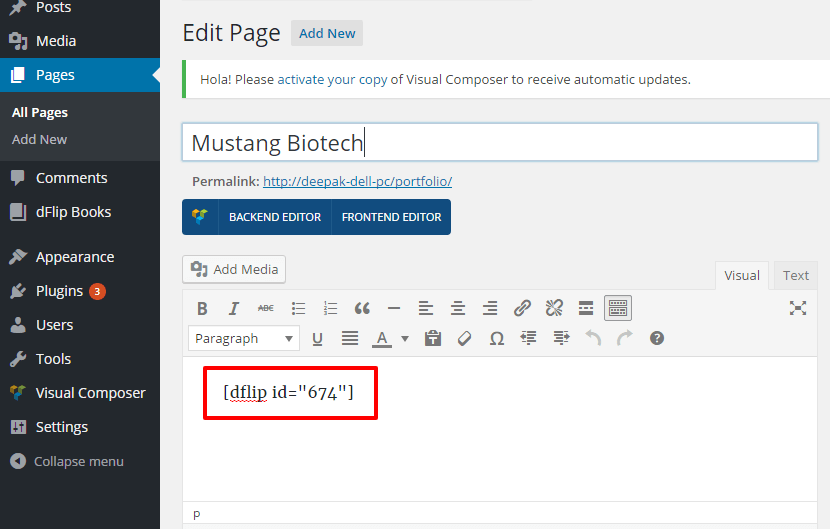
Now create a page and add the shortcode into the textbox.
Using Categories: #
How to Display Multiple flipbooks? #
You can display multiple books at once. We recommend using Book Categories and adding your books to those categories.
[dflip books="category-a"][/dflip]
Displays all the books in category named “category-a“. only 5 latest books will be displayed.
Books limited to only 5! #
By default the multiple books are limited to 5. you can increase the limit by adding the number or showing all.
[dflip books="category-a" limit="-1"][/dflip]
Displays all the books in category-a
More Examples
[dflip books="category-a,category-b" limit="-1"][/dflip]
[dflip books="all" limit="-1"][/dflip]
Notice the limit attribute… -1 for all, 5 for 5 , 10 for 10.. These are created as thumbnails by default.. To convert to buttons use the following shortcode:
[dflip books="category-a" limit="-1" type="button"][/dflip]
the limit atribute is not working for me, It’s limiting to five books always
Hi, Can you share what shortcode you had used? Also in some editors, the quotes are converted to other quotes try adding quotes yourself.
Hi,
How to hide text on the button. I don’t want to show any text on the button.
Hi,
The button from the shortcode will have text.
You can have space in between the shortcode but the button won’t take proper height and width without text.
[dflip id="19" type = "button" ] [/dflip]Alternatively, you can use any other button and wrap it with dflip custom type shortcode.
https://wp.dearflip.com/docs/issues-and-faqs/#custom-buttons
Or did you mean some other button?
Best,
DearHive
Can I make hotspots in am uploaded pdf or can it only be done by uploading individual image files?
Hi,
When using PDF, you can create clickable links and spots using a PDF editor, or Document editor that you later export as PDF.
For image-based flipbook, hotspots can be created using the plugin.
But we recommend using PDF-based methods, for ease of maintainability and future edits.
We create our PDF with links and hotspots using, MS word then exports them as PDF.
Best Regards
He instalado y configurado sin problemas, pero cuando lo publico me sale fondo plomo y la portada de mi libro muy pequeño en miniatura al lado derecho, alguna sugerencia? tengo la versión premium
Note: Premium customers are requested to contact using Premium support channels.
Don’t use comments sections for support.
How are these optimised for SEO? In other words will google index these PDF’s and the contents?
PDF contents are not indexed by Gmail.
What are the benefits of upgrading to the full system. None of the documentation actually tells you wat you get for $37
Hi,
Basically you get premium and faster support, updates, global settings, where you can customize for all flipbooks, you can choose what controls to show and hide, analytics, button/links/custom lightbox, and more.
More importantly, you support us to continue developing the plugin, else we won’t be able to continue improving the plugin.
The documentation is for the premium plugin and also covers the free plugin.
The missing part is only mentioned in the free plugin and it is mentioned on the post page of the free plugin.
Did you try the free version? Start with that and if you feel you need full version then purchase it. Else you don’t need to purchase.
Best,
DearHive
Hey,
I’m looking to use this as an alternative to what we are using now. However, the one feature that we use in the other program is a search feature. Is it possible to have a search button implemented? So that it scans the text of the PDF for certain words?
Also, did I read this correctly, you can do a lifetime of premium for a single $140 price? versus the yearly?
Thanks!
Hi,
Search is planned for future release along with a full redesign of our core code structure. That will be around Nov-December – or early in beta if you apply for the beta.
Annual for WordPress is $39 and lifetime is $119(single site license), plus vat based on your location.
Best Regards
Hello,
Are there any ways to control the size of the thumbnail based on the orientation of the PDF (vertical/horizontal)?
Hi, The thumbnail you add for the cover of the flipbook is manual, so you can set what you like as per the flipbook cover page.
The thumbs for pages inside flipbook auto set as per the orientation.
Hello is it possible to upload many books at once and give them the same design?
Hi,
With the recent version of Premium DearFlip Plugin. YOu can just upload the PDF file to the media section and if attachment URLs are enabled then view the PDF file as flipbook directly as lightbox or inline.
Example:
https://wp.dearflip.com/toa-heftiba-travel-photography-portfolio_opt/
This all can be done without creating individual flipbook posts.
Best,
Deip
why does the pdf appear a littly blurry in dflip as compared to the original file ?
Hi, 3D book is a little curve so the image will be a little curved and causes a little blur. You can try using hard pages. Or for best crisp results disable 3D when there is much text.
Can Flipbooks be sorted by name when displayed by category?
Sorting is not available.
Is it possible to limit the number of pages to display in the flip? I am a writer and we create books, we want to show an example of the books in flip but limiting the number of pages, if customers want to see the complete book they must pay to access and see it in full.
You can help me with the answer to this query to my email [email protected]
Hi,
Pages cannot be limited in the plugin.
Bonsoir,
Veuillez s’il vous plaît me dire pourquoi les livres ne s’affichent pas sur l’Ipad et le téléphone?
Hi,
It can be due to various factors, If you could provide the link to your page, we could study the problem. It could be a third party issue that creates problem in mobiles and is blocking flipbook from operating.
Hello
first question:
can i get the pages quantity from the Dflip object?
second question:
how to create a link, that point to the X page?
something like echo do_shortcode(“[dflip id='{$fBook->ID}' page=5 ][/dflip]“)
thank you
it’s
data-page=5Hey!
We use your plugin and are satisfied but have some thoughts!
According to an earlier comment (August 7, 2020), it seems that you would release search functionality in the plugin at the end of 2020.
With this in mind, we wonder if the search functionality is now in place? And if not, when are you planning to release this?
There is no doubt that this will be one of the best plugins for Flipbooks along with search functionality.
Thanks in advance and looking forward to your reply!
Hi,
DearFlip was initially intended for Image based flipbooks. Later there was PDF support. We planned to add search to it. But due to it’s multiple document formats many PDF based features were getting restricted by it’s initial structure. There are many cases of PDFs which DearFlip cannot serve due to it’s book like structure.
So, we started building DearPDF, a much more robust and versatile PDF specific plugin. https://dearpdf.com/
DearPDF was launched 2 months ago, it supports PDF much better. Has flipbook mode too. Many new features are matured in DearPDF and have also been added to DearFlip.
We will be launching search in DearPDF. DearFlip will get search too once it is stable on DearPDF.
Best Regards,
Deepak