
Skip to content
DearFlip WordPress
  • Plugins
    • WordPress Flipbook
    • JS Flipbook
    • Joomla Flipbook
  • Demos
    • Embedded Example
    • Popup Examples
    • Online PDF Viewer
  • Pricing
  • Docs
  • Support
  • Account
  • Blog
DearFlip WordPress
  • Plugins
    • WordPress Flipbook
    • JS Flipbook
    • Joomla Flipbook
  • Demos
    • Embedded Example
    • Popup Examples
    • Online PDF Viewer
  • Pricing
  • Docs
  • Support
  • Account
  • Blog

Getting Started

  • Getting Started – Quick
  • Installation
  • Create 3D Flipbooks
  • Create Spiral 3D Flipbook (Pro)
  • Create Hybrid 3D Flipbook (Pro)
  • Create PDF Viewer/Reader
  • Create Slider Viewer

Organizing Flipbooks

  • Organizing Flipbooks
  • Multiple Flipbooks in a page
  • Using Categories
  • Using Book Shelf (Pro)
  • Sort Flipbooks (Pro)
  • Open Flipbook with custom buttons & elements(PRO)

Features & Settings

  • Selective Script Loading
  • Features & Settings – Quick
  • Google Analytics(PRO)
  • Settings
  • Shortcode-options

Customizations

  • Customizing Layout / Controls (look)
  • Customizing Buttons
  • Customize popup thumb
  • Customize Page/PDF Links
  • Turn off Zoom on mouse scroll
  • Remove or change Download button
  • Remove Share Button
  • Open Book at certain page
  • Open Flipbook in New Tabs

FAQs

  • Icons are missing?
  • PDF not Loading!
  • PDF loading is slow!
  • Fullscreen Faqs
  • General FAQs & Issues
  • Flipbook loading issue
  • Change Log

Presale, Purchase & License

  • Purchase & Licensing / Upgrading
  • Free(Lite) vs Premium Comparision
  • License Utilization
  • License Activation issues
  • How to Change Invoice details
View Categories
  • Home
  • Documentation
  • Customizations
  • Turn off Zoom on mouse scroll

Turn off Zoom on mouse scroll

< 1 min read

Note: This option is available only in Full version

Zoom on mouse scroll provides easy zoom action on viewing flipbook. By default it is enabled and flipbook zooms in out out while scrolling over he flipbook. This may not be desired by everyone so there is a setting to disable it if needed. The settings are only available in Full Pro version of DearFlip.

Using WordPress Settings: #
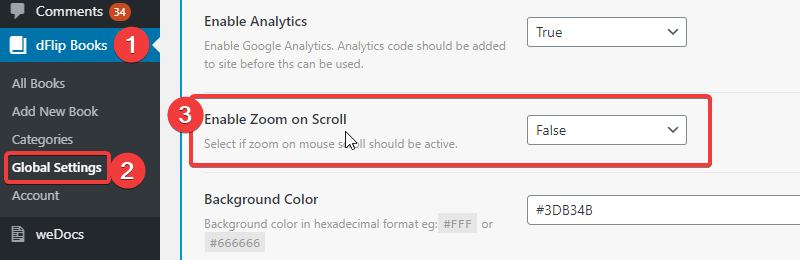
DearFlip Enable / Disable Zoom - DFlip
  1. Goto WordPress Admin section. And click on dFlipBooks Menu
  2. Click on Global Settings under dFlipBooks menu
  3. Under General tab, you can find Enable Zoom on Scroll. Set that to False.

Still stuck? How can we help?

How can we help?

Updated on December 14, 2023

Leave a Comment Cancel reply

Table of Contents
  • Using WordPress Settings:

Links

  • Terms and Conditions
  • License Terms
  • Privacy Policy
  • Browser Test

Recent Posts

  • (no title)
  • Protected: Flipbook in a password page
  • Case Study: Open PDF File links as Flipbook
  • Transparent background example
  • Multiple Embeds in a Page

Products

  • DearFlip 3D Flipbook JS Plugin
  • DearFlip 3D Flipbook WordPress Plugin
  • DearFlip 3D Flipbook Joomla Plugin
  • Online PDF Viewer
  • DearFlip PDF Flipbook for Chrome
  • Mashshare Social Sharing WordPress plugin
© 2026 | A product of DearHive.com